FeaturesCommunityHow it worksFAQ
Support
SupportTrust & privacyTerms Get the beta appDelete my account
Beta Now inviting testers on iOS & Android

Progress that survives a bad week.

Coralio turns what you're working on into a daily rhythm — goals, routines, trackers and a short check-in — and helps you come back when life gets in the way.

Free during betaNo health data requiredDelete anytime
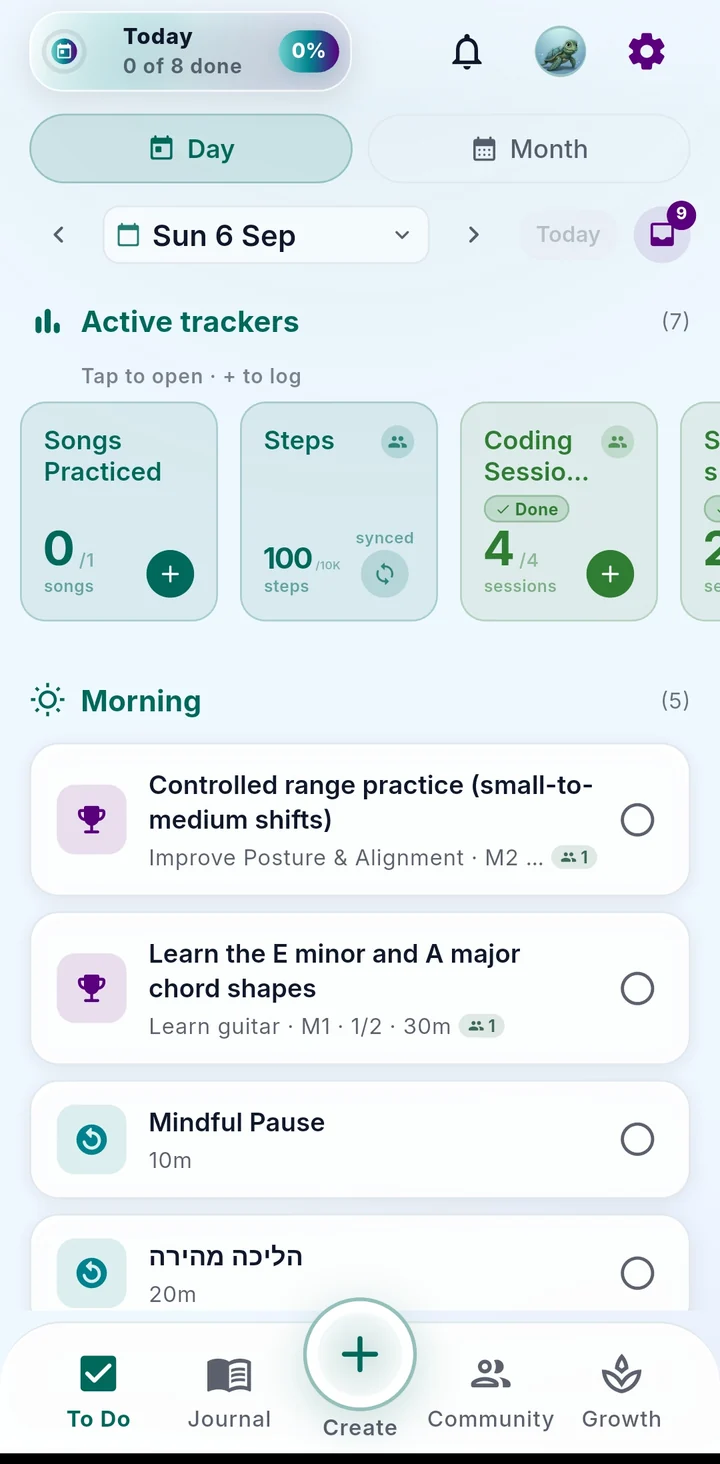
Coralio Today screen with trackers and the day's activities
Sleep 7h 12mauto-filled from Health
Morning check-inenergy: steady · 40 sec
Back after 2 daysroutine adjusted, not reset
Goals → daily steps Routines that bend Trackers & health signals 40-second check-ins Circles of support Coming back, built in
What are you working on?

One app, shaped around your thing.

Tue 28 Jul
Active trackers (2)
Morning (1)
Afternoon (1)
Evening (1)
To DoJournalCreateCommunityGrowth
How it works

Six small moves. Repeated, not perfected.

Each one is a real screen in the app, not a slogan.

1

Choose a direction

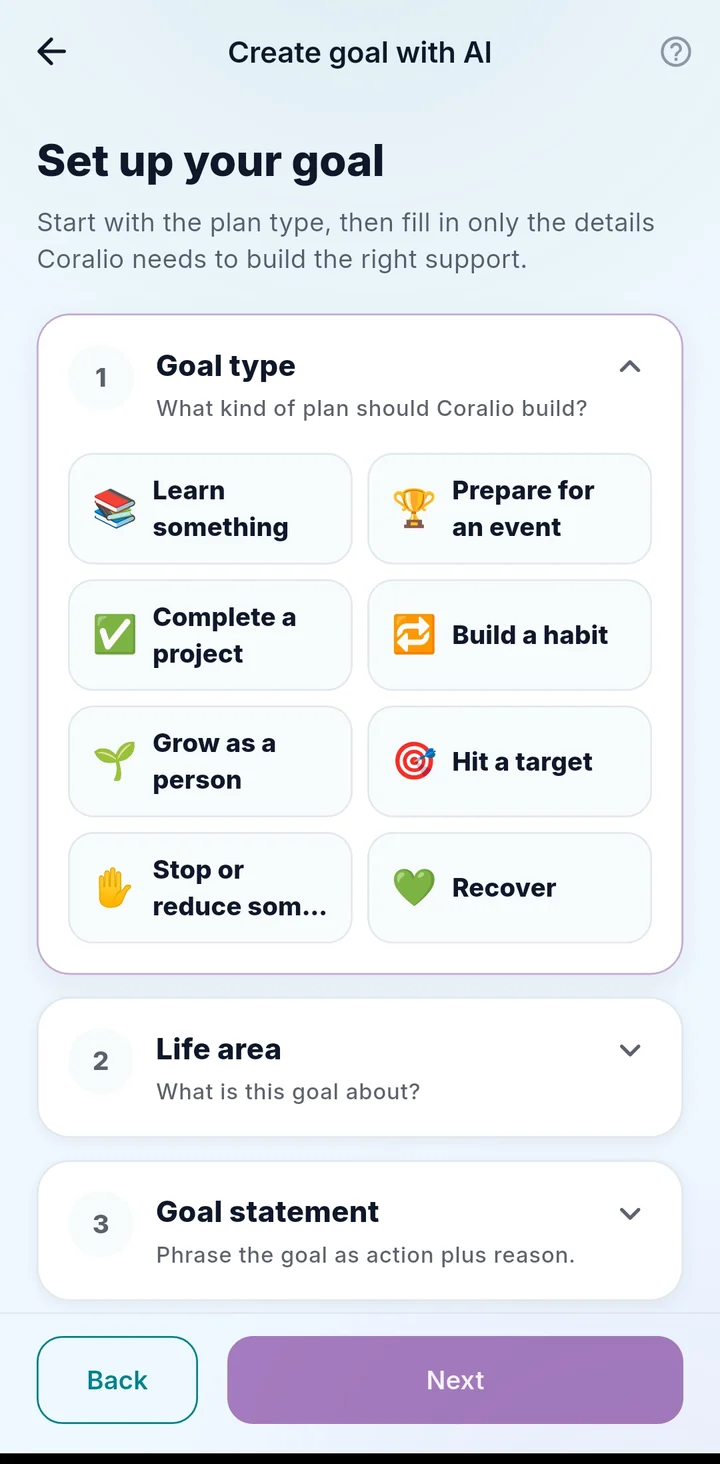
A goal in your words. Eight shapes — learn, prepare, build a habit, hit a number, recover…

Set up your goal: eight goal types
2

Build the rhythm

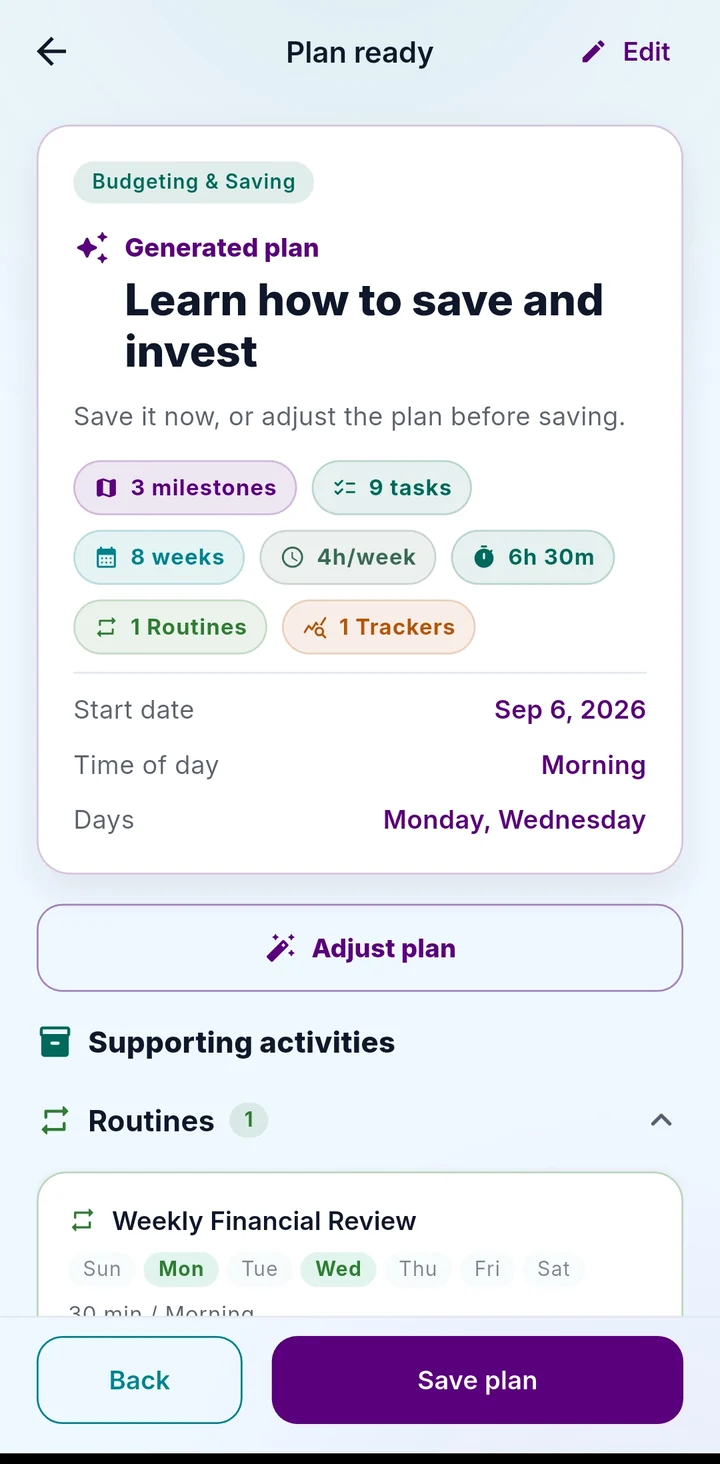
Routines with steps, tasks, reminders — placed into your morning, afternoon, evening.

Plan ready: milestones, tasks, supporting routines and trackers
3

Notice signals

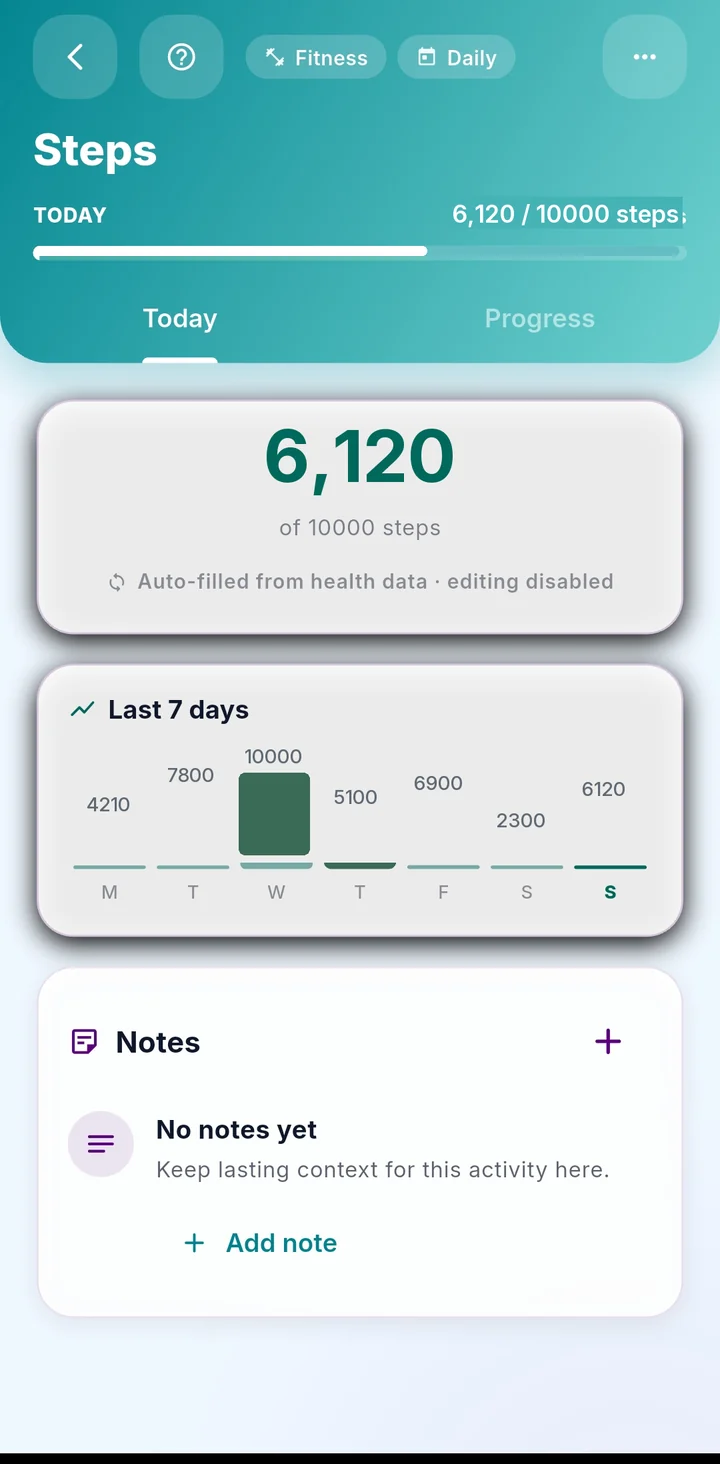
Trackers you log, or steps, sleep and weight read from your phone.

Steps tracker with the last seven days
4

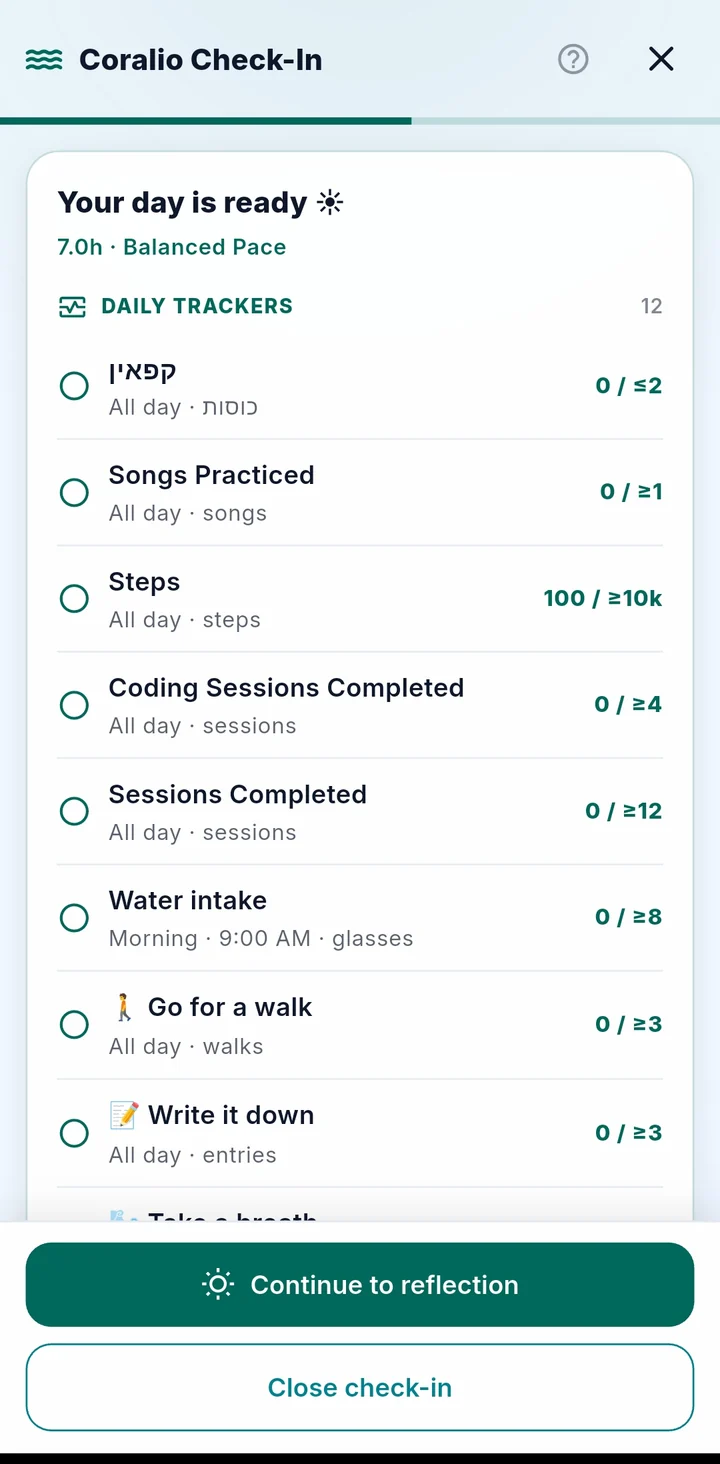
Check in

A 40-second morning conversation. Evening check-out closes the day.

Morning check-in: your day is ready
5

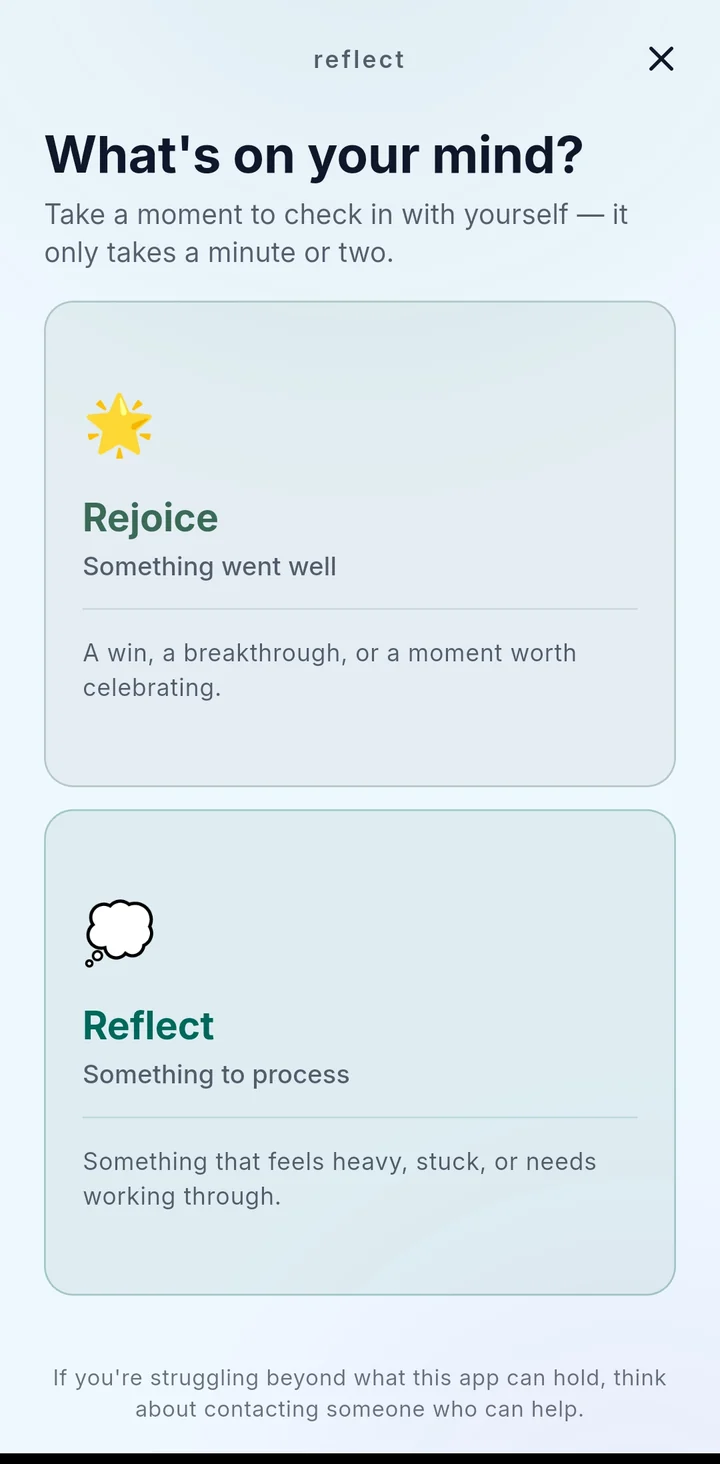
Reflect

When something's heavy — or when you nailed it. Six guided paths.

Reflect: Rejoice or Reflect
6

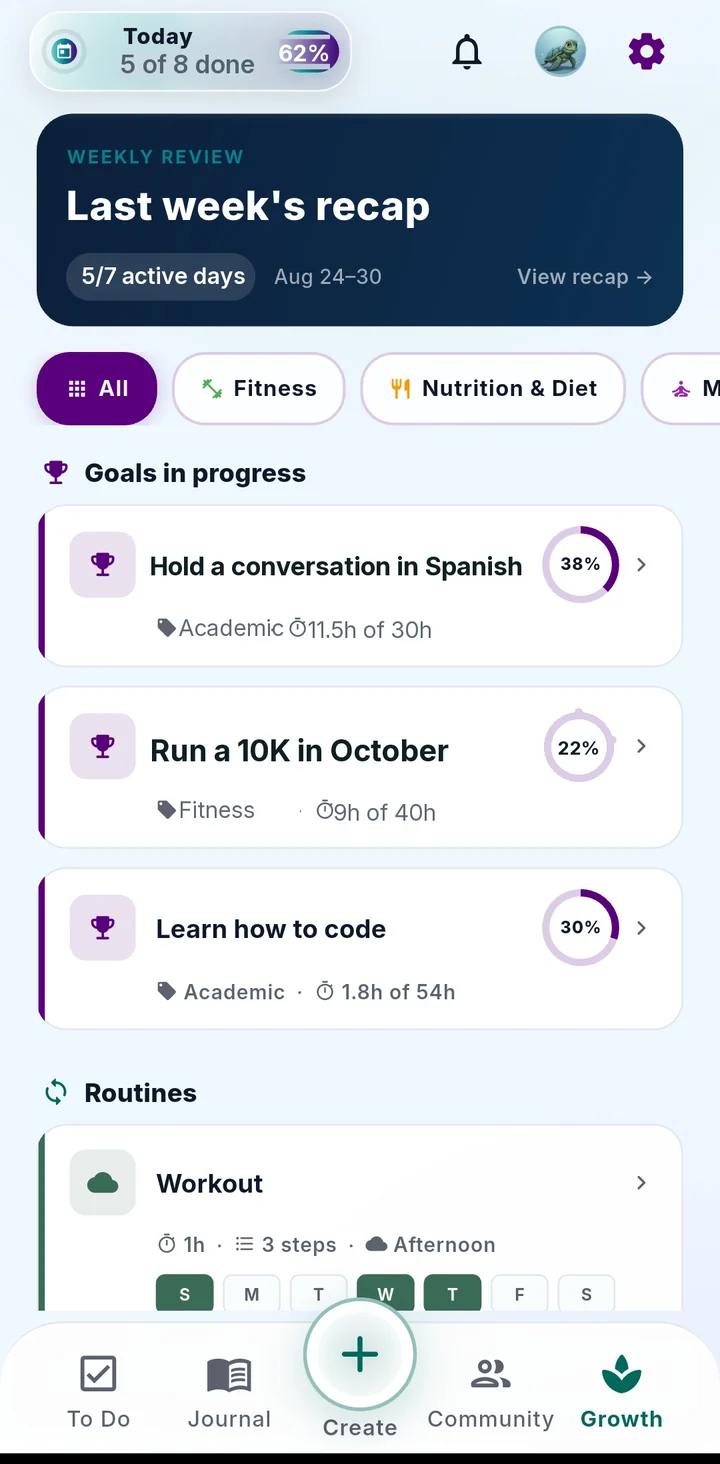
Review and return

The weekly recap shows what held, what slipped, and one next adjustment.

Growth with last week's recap
How a real week goes

Five good days. Two quiet. One comeback.

Tap a day. Coralio counts the day you came back as progress — because it is.

Mon
Tue
Wed
Thu
Fri
Sat
Sun
5 / 7active days — the honest number, not a broken streak
1comeback day, called out in your recap
0"you failed" notifications
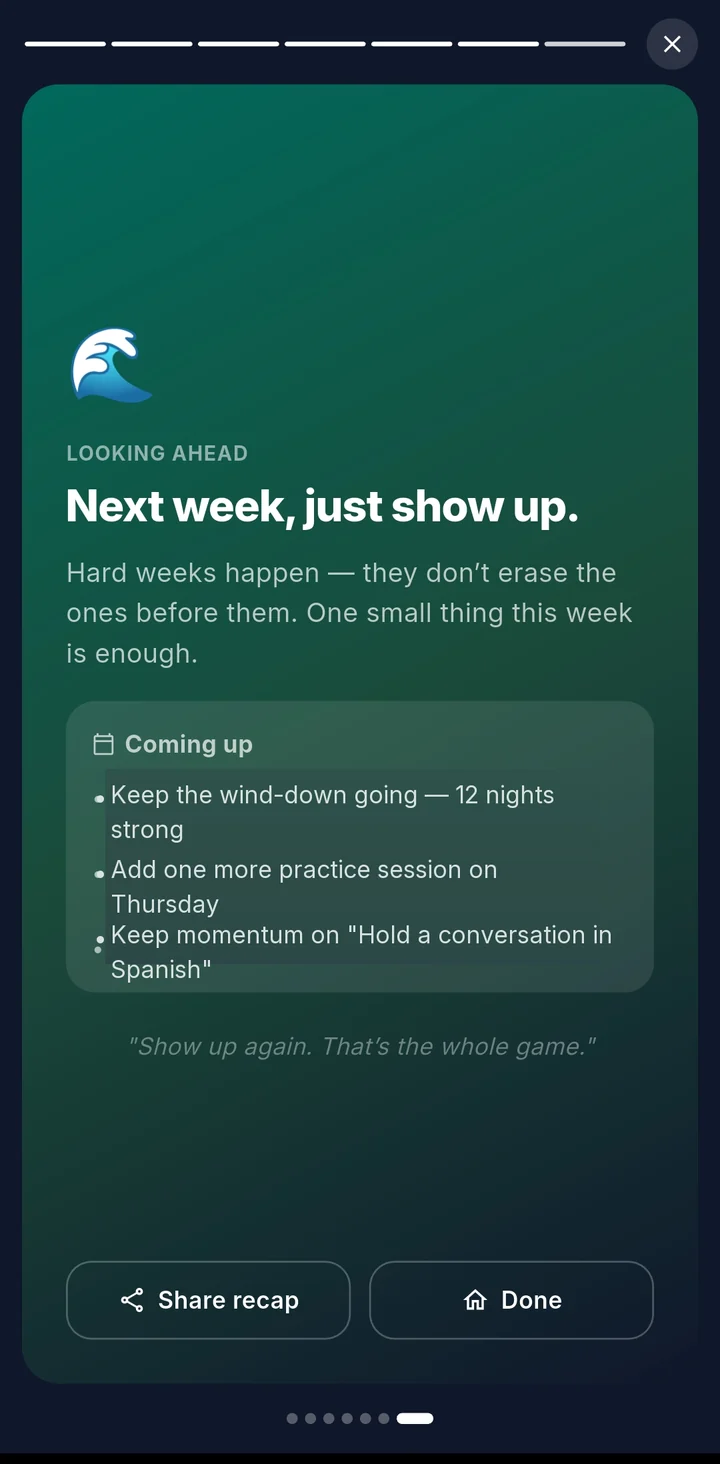
Weekly recap closing: Next week, just show up.
This week, in wordsYou kept the evening wind-down 4 of 5 nights and sleep followed. Thursday and Friday went quiet after a late shift — Saturday's walk is what brought the week back. One adjustment: move the run to Tuesday, when your energy check-ins are highest.
Circles of support

You're not doing this alone in a spreadsheet.

Three layers of support, in the order you'll meet them.

🐢
In the app

Guardian

The coach that's on whatever screen you're on. Ask what a milestone is, get a tour, or build your first goal together — no manual required.
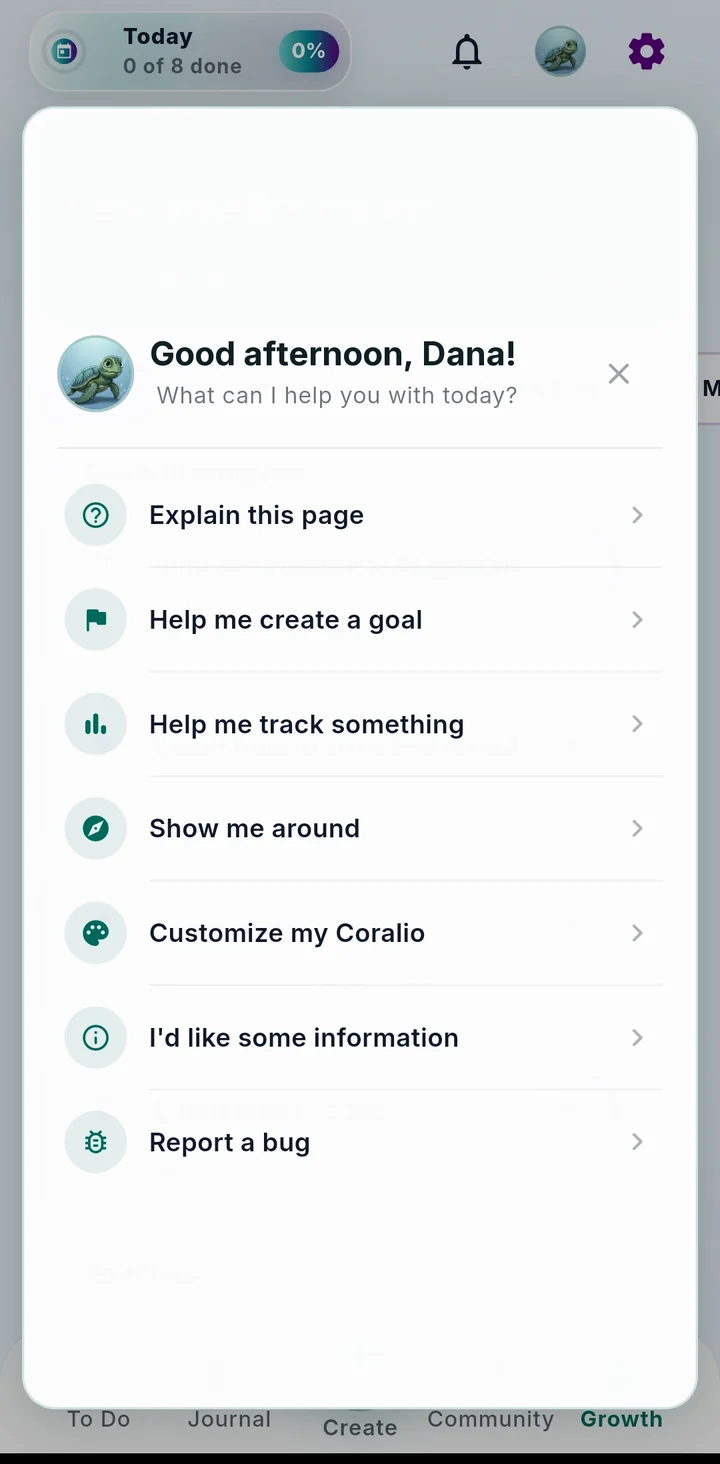
Guardian panel: explain this page, help me create a goal, show me around
Meet Guardian
With yourself

Reflect

For the hard days and the good ones. Tap what's true right now.

See the six paths
With people you trust

Community

Not a feed. Not a forum. Share one goal with a friend or a small group, choose how much they see, and send a cheer when they need one.
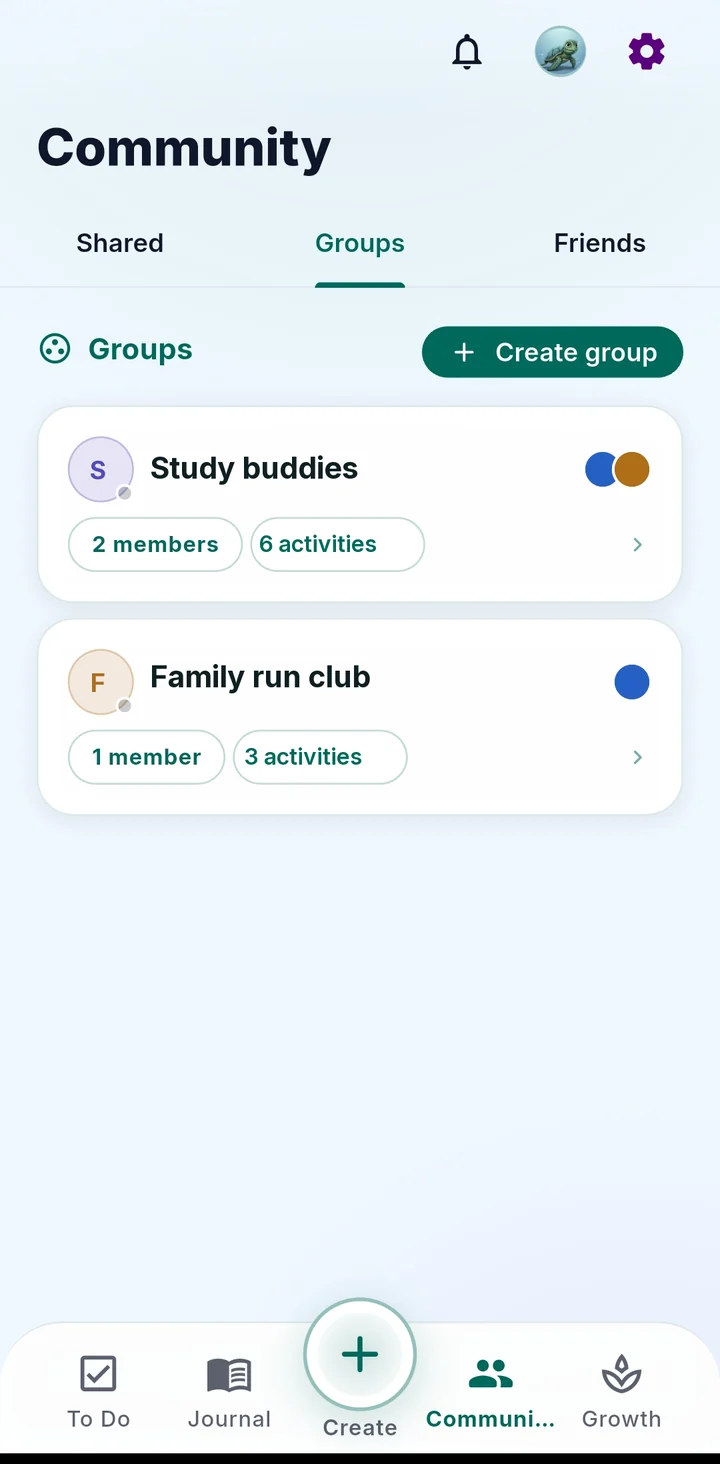
Community: Groups tab
How Community works
Sessions

Sit down. Start. Leave with notes.

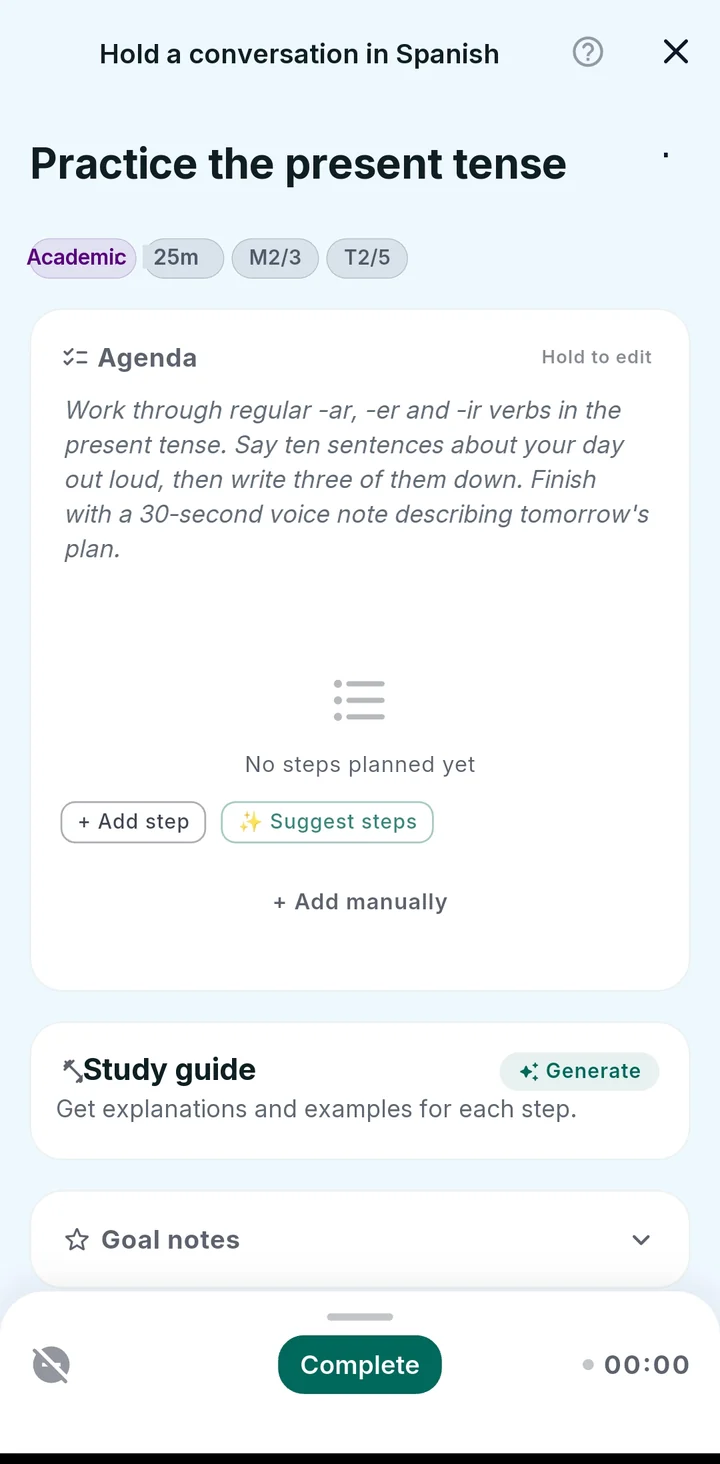
A focus workspace attached to any goal or routine — with the last session's context waiting for you.

Focus timer + Do Not DisturbTap to start. Your phone goes quiet.
Break it into stepsAITurns "study chapter 4" into an agenda you can tick.
Study guide and flashcardsAIGenerated for this session. Mark correct or practice again.
Notes and notebookWhat I learned · Stuck on · Next step — carried into the next session.
CloseoutWhat got done writes back to the goal, routine and journal.
Session workspace: agenda, suggest steps, study guide, complete
Progress identity Direction

Your effort grows a reef.

Every routine kept, signal logged and comeback day will add to a slow, organic structure that's yours. No points on a leaderboard, no prize wall — proof that you showed up.

Routinesbuild structure
Trackersadd colour
Check-inscreate light
Comebacksregrow what faded
Boundaries

Built to help. Not to diagnose, sell, or nag.

Read-only healthSteps, sleep, weight can fill trackers. Coralio never writes to Health.
Manual always worksEvery feature works without connecting anything.
AI & analytics are opt-inTwo separate switches in Settings, off until you flip them.
Sharing is summaries onlyFriends see the progress you choose. Never your notes or logs.

Coralio supports health-adjacent habits but is not a medical, mental-health, legal or financial tool. Read the trust page →

Before you join

Questions that matter first.

Four we get most. All of them →

Is Coralio free?

Yes, during the beta. Our priority right now is making it a genuine support system — one that actually helps you come back — before we add a paid layer. And even when pricing comes, there will always be a basic free version.

Do I have to connect health data or use AI?

No. Every tracker works manually, and AI (goal roadmaps, session steps and flashcards, the recap summary) is a separate opt-in switch in Settings.

Which languages and devices?

iOS and Android. English, Deutsch, Español, Français, עברית and Русский.

What do friends actually see if I share something?

Only the summary level you pick — total, weekly total, or daily detail — for that one activity. Never your notes, reflections, or other activities. You can end a share anytime and keep everything private.

Early access

Be in the first hundred.

The beta is for people working on something real who'll use Coralio for a week and tell us where it got in the way.

Free during beta. Our priority right now is making Coralio a genuine support system before adding a paid layer — and even when pricing comes, there will always be a basic free version.
We reply within a few days. Your email is only used for beta access and product updates. Privacy

You're on the list.

Watch for an email from us within a few days.

Get the beta app